
Victron Energy Cerbo GX MK2
Home / Equipment catalogue / Energy & Electrical / Victron Energy Cerbo GX MK2
Victron Energy · Code BPP900450110
Monitoring & Connectivity · Cerbo GX MK2
Energy & Electrical · Instruments & Networks
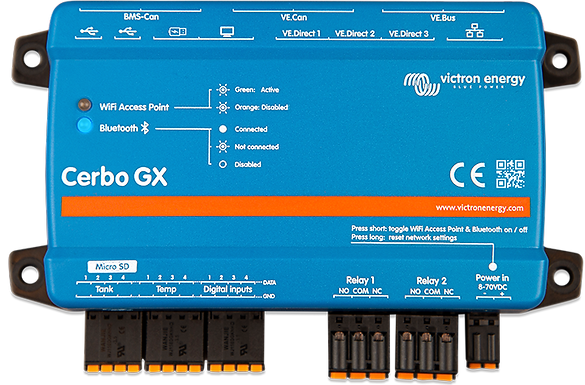
Representative image of the range Cerbo GX. Appearance, connections and package contents vary by version.
Image: Victron Energy
Discover the product
Victron Energy electrical system monitoring or control unit, version Cerbo GX MK2. This specific version has an ingress protection rating of IP20.
Compatible equipment
Documented connections for specific catalogue codes, including parts, requirements and manufacturer sources. Selected equipment ranges are covered; an unlisted combination does not imply incompatibility. Each connection path is assessed separately and is not a complete installation design.
207 documented connections · Sources checked: 2026-10-10
Explore connections, components & diagrams ↗
Equipment connection guide ↗
Battery Monitor BMV-700 · BAM010700000
Cerbo GX MK2 / MK3 · Direct
VE.Direct
Additionally required:1 × ASS030530218 — VE.Direct Cable 1,8m
Functions: Data monitoring on GX and VRM.
Up to 10 m using VE.Direct cable; VE.Direct extensions must not be joined together.
Selected example: 1.8 m cable. Choose the appropriate length for the specific installation.
This path is for data communication. Design power supply, fuses and power wiring separately.
Victron — VE.Direct cable · Official manufacturer page · checked 2026-10-10
Battery Monitor BMV-700 · BAM010700000
Cerbo GX MK2 / MK3 · With an adapter
USB-A
Additionally required:1 × ASS030530010 — VE.Direct to USB interface
Functions: Data monitoring through an available GX USB port.
Each device needs its own interface; the GX’s total USB / VE.Direct device limits apply.
This path is for data communication. Design power supply, fuses and power wiring separately.
Victron — VE.Direct cable · Official manufacturer page · checked 2026-10-10
Victron — VE.Direct to USB interface · Official manufacturer page · checked 2026-10-10
Battery Monitor BMV-702 · BAM010702000
Cerbo GX MK2 / MK3 · Direct
VE.Direct
Additionally required:1 × ASS030530218 — VE.Direct Cable 1,8m
Functions: Data monitoring on GX and VRM.
Up to 10 m using VE.Direct cable; VE.Direct extensions must not be joined together.
Selected example: 1.8 m cable. Choose the appropriate length for the specific installation.
This path is for data communication. Design power supply, fuses and power wiring separately.
Victron — VE.Direct cable · Official manufacturer page · checked 2026-10-10
Battery Monitor BMV-702 · BAM010702000
Cerbo GX MK2 / MK3 · With an adapter
USB-A
Additionally required:1 × ASS030530010 — VE.Direct to USB interface
Functions: Data monitoring through an available GX USB port.
Each device needs its own interface; the GX’s total USB / VE.Direct device limits apply.
This path is for data communication. Design power supply, fuses and power wiring separately.
Victron — VE.Direct cable · Official manufacturer page · checked 2026-10-10
Victron — VE.Direct to USB interface · Official manufacturer page · checked 2026-10-10
Battery Monitor BMV-702 BLACK · BAM010702200
Cerbo GX MK2 / MK3 · Direct
VE.Direct
Additionally required:1 × ASS030530218 — VE.Direct Cable 1,8m
Functions: Data monitoring on GX and VRM.
Up to 10 m using VE.Direct cable; VE.Direct extensions must not be joined together.
Selected example: 1.8 m cable. Choose the appropriate length for the specific installation.
This path is for data communication. Design power supply, fuses and power wiring separately.
Victron — VE.Direct cable · Official manufacturer page · checked 2026-10-10
Battery Monitor BMV-702 BLACK · BAM010702200
Cerbo GX MK2 / MK3 · With an adapter
USB-A
Additionally required:1 × ASS030530010 — VE.Direct to USB interface
Functions: Data monitoring through an available GX USB port.
Each device needs its own interface; the GX’s total USB / VE.Direct device limits apply.
This path is for data communication. Design power supply, fuses and power wiring separately.
Victron — VE.Direct cable · Official manufacturer page · checked 2026-10-10
Victron — VE.Direct to USB interface · Official manufacturer page · checked 2026-10-10
View all 207 connections in the guide ↗
Functions & interfaces
Bluetooth
Interface:Bluetooth
Technical specifications
Equipment type
Monitoring & Connectivity
Series
Cerbo GX
Bluetooth
Yes
Ingress protection
IP20
Height
78 mm
Width
154 mm
Enclosure depth
48 mm
Operating temperature
[-20, 50] °C
Ethernet
10/100 RJ45 socket - isolated except shield
USB
3 USB Host ports
Ports VE.Direct
3 (max. possible VE.Direct devices: 15)
Ports VE.Can
Yes VE.Can 1 isolated VE.Can 2 non-isolated
VE.Bus
2 paralleled RJ45 sockets
Wi-Fi
Built-in
Selection & compatibility
This model is included in our catalogue. The exact configuration, compatibility and supply availability are confirmed when you contact us.
Browse the equipment
Kit contents, interfaces and required accessories are checked for the exact part number. Connection to another system does not mean all functions are built in.
Is it right for your vessel?
Tell us about your vessel, existing equipment and requirements. Elmare will help you choose the right configuration.
Request information by email ↗
+30 210 400 2538
Elmare · 1 Proussis Street, Keratsini